

Model Context Protocol (MCP) Explained: The Open Standard Connecting AI to Everything
Model Context Protocol (MCP): The USB Moment for AI Tools
In the 1990s, connecting a printer to your computer meant hunting for the right driver, dealing with proprietary software, and praying nothing broke. Then USB arrived and standardized the whole thing. One port, one protocol, any device.
AI tools in 2025 had the same problem that computers had before USB. Every AI integration was custom-built. Connecting Claude to your database meant writing custom code. Connecting it to your CRM meant more custom code. Each integration was one-off, brittle, and hard to reuse.
In November 2024, Anthropic released the Model Context Protocol — and by mid-2026, it had become the closest thing to a USB standard the AI world has ever had. Over 1,000 MCP servers are now publicly available on GitHub. Google, Microsoft, and Replit have all adopted it. If you’re building AI applications, this is not optional knowledge.
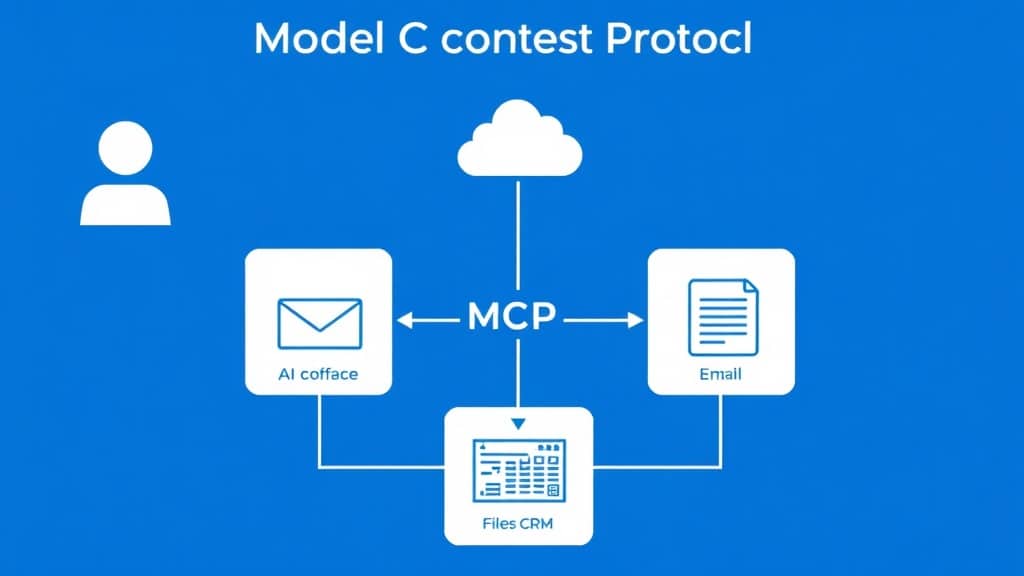
- MCP is an open protocol defining how AI models connect to tools, data sources, and context.
- Think of MCP servers as plugins: they expose tools (functions), resources (data), and prompts (templates) to any compatible AI client.
- Claude Desktop, Cursor, and custom agents all support MCP natively in 2026.
- One MCP server built for Postgres works with any MCP-compatible AI — write it once, use it everywhere.
- MCP replaces the bespoke integration code you’d otherwise write for every AI tool connection.
How MCP Works (The Non-Jargon Version)
MCP defines three kinds of things a server can expose:
- Tools — callable functions.
search_database(query),send_email(to, subject, body),get_student_progress(student_id). The AI calls these like functions. - Resources — data the AI can read. Files, database rows, API responses. Accessed by URI:
postgres://courses/table/enrollments. - Prompts — reusable templates with parameters.
review_student_code(language='python').
The communication happens over JSON-RPC 2.0. For local servers, it goes through stdio (process stdin/stdout). For remote servers, HTTP with Server-Sent Events. You don’t need to understand the protocol details to use it — the SDKs handle all of that.
| Approach | MCP | Custom function calling | Direct API integration |
|---|---|---|---|
| Reusability | Build once, use with any MCP client | Custom per AI system | Custom per integration |
| Setup time | Minutes (use existing servers) | Days to weeks per integration | Days to weeks per integration |
| Maintenance | Server maintained by community/vendor | Your team owns it | Your team owns it |
| Schema definition | Automatic from server | Manual for each function | Manual |
| Works across AI providers | Yes — Claude, GPT-4o, Gemini | No — provider-specific | No |
| 80+ pre-built servers available | Yes | No | No |
Setting Up Your First MCP Server (5 Steps)
- Choose a client: Claude Desktop or Cursor both support MCP natively. For custom agents, install the Python SDK:
pip install mcp - Find an existing server: Check
github.com/modelcontextprotocol/servers— 80+ pre-built servers for Postgres, GitHub, Google Drive, Slack, Puppeteer, and more. You might not need to build anything from scratch. - Configure in your client: For Claude Desktop, add the server to
claude_desktop_config.jsonundermcpServers. Specify the command to start the server and any environment variables (API keys, database URLs). - Build a custom server (if needed): Decorate Python functions with
@server.tool(). Define inputs as Pydantic models for automatic schema generation. The SDK handles all protocol marshaling. A basic server is 30–50 lines of Python. - Test with MCP Inspector: The official debugging tool lets you test any server’s tools directly from a browser interface. Always test here before integrating with an AI client — it’s much faster to debug.
Security: Always scope MCP server permissions to the minimum required. A server that can only read course data shouldn’t have write access to student records. Treat MCP server permissions like you would database access control.
What This Looks Like in EdTech
Student support agent: An AI agent connected to three MCP servers — LMS (course progress, enrollment status), payment processor (billing history, subscription status), and support ticketing (past tickets, resolution history). When a student asks “why is my course access not working?”, the agent can actually check all three systems and give a real answer. No more “please contact support.”
Content creation copilot: An MCP server exposing the course content library lets instructors ask their AI assistant to “write a quiz question about backpropagation that matches the level of Week 4 content” — and the AI actually references the existing course material instead of generating generic content.
Free 2026 Career Roadmap PDF
The exact SQL + Python + Power BI path our students use to land Rs. 8-15 LPA data roles. Free download.
Admin automation: An MCP server over the LMS database lets administrators ask natural language questions: “Which students in the Python cohort haven’t logged in this week?” — and get actual data back, not a generic SQL tutorial.
Case Study: Support Escalation Rate Cut by 70%
A certification platform’s AI chatbot could previously only answer FAQ questions. Any question requiring account-specific information — “when does my subscription expire?”, “why was I charged twice?”, “which videos have I completed?” — required escalation to a human agent. Escalation rate: 60% of all chats.
They built three MCP servers: LMS (enrollment and progress queries), Stripe (payment history), and Zendesk (ticket history). The AI agent was connected to all three. For the first time, it could actually look things up.
Result: Escalation rate dropped from 60% to 18% within 6 weeks. The platform automatically resolved ~2,400 tickets per month. Support staff were reassigned to proactive customer success work instead of reactive FAQ answering.
Common Mistakes
- One monolithic server for everything. An MCP server that handles LMS + payments + CRM + support is hard to maintain and security-audit. Build one server per domain. They’re small enough that this is not significant overhead.
- Skipping MCP Inspector during development. Testing through an AI client when you’re debugging server behavior is slow and confusing. Inspector gives you direct tool invocation with immediate feedback. Use it first.
- No input validation. MCP tools that accept arbitrary SQL strings are an injection risk. Use Pydantic models with strict validators for all tool inputs — the SDK makes this trivial.
FAQ
Is MCP only for Claude?
No. MCP is an open standard. OpenAI, Google, and dozens of open-source projects have adopted it. Any LLM with tool-calling capability can use MCP-compatible servers.
Do I need TypeScript or can I use Python?
Python is fully supported and the Python SDK is production-ready. TypeScript has slightly more mature tooling, but Python works excellently for most use cases.
How is MCP different from OpenAI function calling?
OpenAI function calling is provider-specific and only handles tools (functions). MCP is universal (works with any AI provider), handles tools, resources, and prompts, and has a growing ecosystem of pre-built servers.
Is MCP production-ready?
Yes — the protocol is stable and v1.0 was released in early 2026. Thousands of production deployments are running MCP-based agents today.
Why This Matters More Than You Might Think
Standardization is always more important than it looks in the moment. REST standardized web APIs and enabled the entire API economy. Docker standardized container packaging and enabled the cloud-native stack. MCP has the same potential for AI integrations — a universal protocol that means any tool can work with any AI model.
The right move today: pick one area where your AI application is currently blocked by lack of tool access, build an MCP server for it, and see how the experience changes. One afternoon of work, and your AI agent actually knows things.
Build AI systems that actually connect to your data — join GrowAI
Live mentorship • Real projects • Placement support
Ready to start your career in data?
Book a free 1-on-1 counselling session with GrowAI. Personalised roadmap, zero pressure.

