Special Launch Price: Enroll at 98% off — Full course for ₹1,999 (was ₹24,999). Limited seats available. Enroll now →
RECOGNISED BY: Startup India Recognised ISO Certified MSME Certified AICET Approved Industry Approved | RECOGNISED BY: Startup India Recognised ISO Certified MSME Certified AICET Approved Industry Approved |
Offered by  GROWAI EdTech Solution Pvt. Ltd.
Enrollments Open — Batch 2026

Master UI/UX Design Masterclass

Learn UX Research, Figma mastery, wireframing, prototyping, design systems & developer handoff — build a job-ready product design portfolio. All in just ₹1,999.

4.8 ★★★★★ (842+ Ratings)  ·  100% Job Assistance
Beginner Friendly Industry Portfolio Bestseller ISO Certified
3 Months Live Sessions Hybrid Learning LMS Access
8+Modules
3Months
NewBatch
4.8★Rating
Offer Ends In
00Hrs
:
00Min
:
00Sec
₹999 ₹1,999 98% OFF — Limited Time
  • AI & Cloud Integration
  • Business Branding Mastery
  • Figma & Python Workflows
  • And many more...
Get Started Today
// Table of Contents
Complete Course Syllabus
// Key Takeaways
What You'll Learn
Master UX Research methods: Interviews, Personas, and Surveys
Design Information Architecture and user-centric Sitemaps
Create professional Wireframes from low to high-fidelity
Deep dive into Figma: Auto Layout, Components, and Variants
Build advanced Interactive Prototypes with Smart Animate
Develop scalable Design Systems and Component Libraries
Master Visual Design: Typography, Color Theory, and Grids
Execute Usability Testing and design iterations based on data
Build a job-ready UX Case Study and professional Portfolio
Integrate AI tools like ChatGPT and Uizard into design workflows
Figma UX Research UI Design Prototyping Design Systems Wireframing User Testing Auto Layout Information Architecture Case Study AI Design
// Learning Journey
Course Roadmap
WEEK 1
UX Research — Understanding Users
Learn what UX is, why it matters for businesses, and master the foundational research methods — user interviews, surveys, observation and heuristic evaluation.
Module 01UX ResearchDesign Thinking
WEEK 2
Personas, User Stories & Information Architecture
Create evidence-based user personas, map customer journeys, and design site maps and navigation using card sorting and tree testing techniques.
Module 02PersonasIAFigJam
WEEK 3
Wireframing — Lo-fi to Hi-fi
Master the wireframing process from pen-and-paper sketches to Figma digital wireframes. Learn when to use lo-fi vs hi-fi and how to annotate for handoff.
Module 03WireframesFigma
MILESTONE — END OF MONTH 1
Mid-Course Assessment & Wireframe Review
Review all Month 1 concepts. Live wireframe critique session, mock test, and one-on-one doubt clearing. You'll present your first wireframed user flow.
Portfolio Piece 1Peer Review
WEEK 4–5
Figma Mastery — UI Design
Deep dive into Figma — frames, components, auto layout, colour styles, grids and responsive design. Design high-fidelity screens for mobile and desktop.
Module 04FigmaUI Design8-pt Grid
WEEK 6
Prototyping & Micro-Interactions
Connect screens with Figma prototyping flows, create smart animate transitions, overlay interactions and micro-interactions that delight users.
Module 05PrototypingSmart Animate
WEEK 7
Design Systems & Component Libraries
Build atomic design components, master auto layout variants, design tokens and publish a shared component library that scales for real teams.
Module 06Design SystemTokens
MILESTONE — END OF MONTH 2
Portfolio Review Session
Present your complete Figma project — wireframes, hi-fi designs, prototype and design system. Receive structured feedback and start prepping your case study.
Portfolio Piece 2Case Study Draft
WEEK 8
Usability Testing with Real Users
Plan and run moderated and unmoderated usability tests using Maze and Lyssna. Analyze heatmaps with Hotjar and iterate on your designs based on real feedback.
Module 07MazeHotjarUsability
WEEK 9–10
Developer Handoff & Career Preparation
Use Figma Dev Mode and Zeplin to hand off designs to developers. Build your UX/UI case study portfolio, polish your LinkedIn, and apply for your first UI/UX role.
Module 08Dev HandoffPortfolioCareer
GRADUATION — COURSE COMPLETION
Final Case Study & Certificate Ceremony
Final project submission — complete UX case study with research, wireframes, hi-fi designs, prototype and usability test results. Receive your industry certificate.
Case StudyCertificationCareer Support
// Detailed Curriculum
All Modules
01
BeginnerWeek 12 hrs
UX Research & User Psychology
// Topics Covered
  • What is UX and why it matters for businesses
  • Difference between UI and UX — common misconceptions
  • UX research methods — interviews, surveys, observation
  • The psychology of design — Gestalt principles, cognitive load
  • Heuristic evaluation basics — 10 Nielsen heuristics
  • Understanding the design thinking framework (5 stages)
// Tools
AI
ChatGPT
Free — research synthesis & summaries
FREE
Google Forms
Free — user surveys & questionnaires
PAID
Maze
Remote user research & usability testing
02
BeginnerWeek 22 hrs
User Personas & Information Architecture
// Topics Covered
  • Creating evidence-based user personas
  • Customer journey mapping — pain points and opportunities
  • Site maps and navigation design
  • Card sorting and tree testing for information architecture
  • User stories and defining acceptance criteria
  • Jobs To Be Done (JTBD) framework
// Tools
AI
Notion AI
Free — persona document generation
FREE
FigJam
Free — collaborative journey mapping & IA
PAID
Optimal Workshop
Card sorting & tree testing platform
03
BeginnerWeek 32 hrs
Wireframing & Sketching
// Topics Covered
  • The wireframing process — from sketch to digital
  • Lo-fi vs hi-fi wireframes — when to use each
  • Wireframing with pen and paper first
  • Moving to Figma for digital wireframes
  • Annotating wireframes for stakeholder handoff
  • Getting feedback and iterating on wireframes
// Tools
AI
Uizard AI
Free — sketch-to-wireframe AI conversion
FREE
Figma Free
Free — industry standard wireframing
PAID
Balsamiq
Rapid lo-fi wireframing tool
04
IntermediateWeek 4–52 hrs × 2
Figma Mastery — UI Design
// Topics Covered
  • Figma workspace — frames, pages, layers and components
  • Typography hierarchy and scale in Figma
  • Colour styles, gradients and design tokens
  • Grids and spacing — 8-point grid system
  • Designing high-fidelity screens — mobile and desktop
  • Responsive design using constraints and breakpoints
  • Auto layout deep dive — responsive components
// Tools
AI
Figma AI
Beta — AI-powered design suggestions
FREE
Figma Community
Free — UI kits, icons & templates
PAID
Figma Professional
Team libraries & unlimited projects
05
IntermediateWeek 6–72 hrs
Prototyping & Interaction Design
// Topics Covered
  • Figma prototyping connections and flows
  • Smart animate and overlay interactions
  • Micro-interactions — hover states, loading animations
  • Scroll, parallax and sticky elements in prototypes
  • Sharing prototypes with stakeholders for feedback
  • Walkthrough and presentation of interactive prototypes
// Tools
AI
Framer AI
Free tier — AI-powered web prototyping
FREE
Figma Prototyping
Free — built into Figma
PAID
Principle
Advanced motion prototyping for Mac
06
AdvancedWeek 8–92 hrs
Design Systems & Component Libraries
// Topics Covered
  • What is a design system and why teams need one
  • Atomic design — atoms, molecules, organisms, templates
  • Creating reusable components with variants
  • Design tokens — colors, spacing, typography
  • Interactive components and component properties
  • Publishing and maintaining a shared component library
// Tools
AI
Tokens Studio
Free plugin — design token management
FREE
Material Design 3 Kit
Free — Google's design system kit
PAID
Zeroheight
Design system documentation platform
07
IntermediateWeek 102 hrs
Usability Testing & Iteration
// Topics Covered
  • Planning a usability test — script, tasks and goals
  • Moderated vs unmoderated testing methods
  • Running a remote usability test with Maze
  • Hotjar for heatmaps and session recordings
  • Analyzing test results and prioritizing issues
  • Iterating on designs based on user feedback
// Tools
AI
Maze AI Insights
AI — automated test result analysis
FREE
Lyssna
Free tier — unmoderated user testing
PAID
Hotjar
Heatmaps & session recording
08
All LevelsWeek 11–122 hrs × 2
Developer Handoff & Career Prep
// Topics Covered
  • Figma Dev Mode — inspecting spacing, colors and code snippets
  • Writing design specifications and redlines
  • Exporting assets for iOS, Android and web
  • Using Zeplin for enterprise-level handoffs
  • Building your UX/UI portfolio — case study structure
  • Job search — LinkedIn, Dribbble, Behance & UX communities
  • Resume preparation and mock UI/UX interviews
// Tools
AI
ChatGPT
Free — case study writing & interview prep
FREE
Figma Dev Mode
Free — inspect & export designs to code
PAID
Zeplin
Enterprise design-to-dev handoff
// Design Software
Figma vs Adobe XD
Feature Figma Adobe XD
Collaboration Real-time multi-user Basic co-editing
Platform Browser + Native Apps Mac & Windows Only
Pricing Free Tier Available Paid Subscription
Prototyping Advanced (Smart Animate) Good
Handoff Built-in Dev Mode Requires Plugins
Industry Standard #1 Choice Declining
// All Tools at a Glance
Complete Tools Reference
Module AI Tool Free Tool Paid Tool
UX Research ChatGPT Google Forms Maze
Personas & IA Notion AI FigJam Optimal Workshop
Wireframing Uizard AI Figma Free Balsamiq
UI Design Figma AI Figma Community Figma Professional
Prototyping Framer AI Figma Prototyping Principle
Design Systems Tokens Studio Material Design 3 Zeroheight
Usability Testing Maze AI Insights Lyssna Hotjar
Dev Handoff ChatGPT Figma Dev Mode Zeplin
// Course Completion

Your Certificate
GROWAI EdTech Logo
Certificate of Completion
GROWAI EdTech
This is to certify that
[ Student Name ]
has successfully completed the
UI/UX Design Masterclass
conducted by GROWAI EdTech Solution Pvt. Ltd.
Duration: 3 Months | Year: 2026
Director
Course Head
Examiner
Industry Recognised
Recognised by Startup India, ISO certified and MSME approved — adds real value to your UX/UI portfolio and resume.
Verifiable Online
Every certificate has a unique ID verifiable on www.growaiedtech.com — share with employers or clients with confidence.
Share on LinkedIn
Add directly to your LinkedIn profile and get noticed by product companies, startups and UX recruiters worldwide.
Digital Copy
Receive a high-resolution digital certificate instantly via email upon course completion — download and share anytime.
// Official Certificates & Recognitions
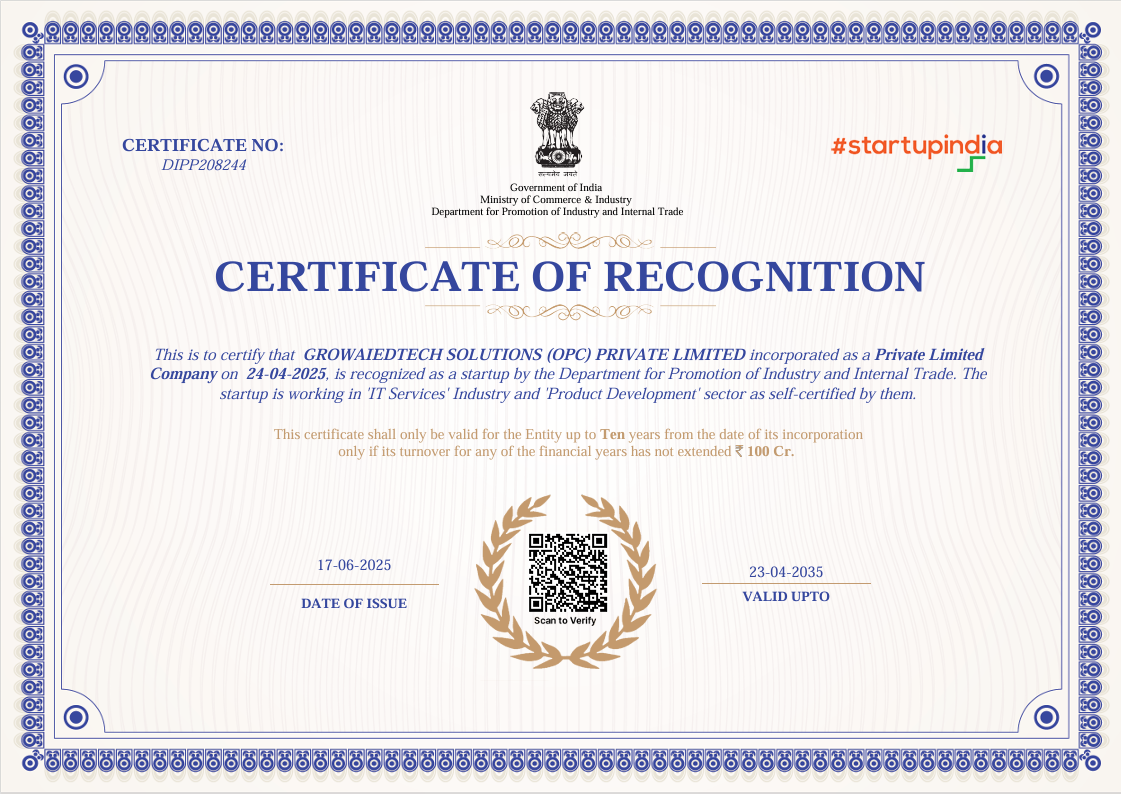
STARTUP INDIA RECOGNISED
Startup India Certificate
ISO CERTIFIED
ISO Certification Portrait
Startup India
DPIIT Recognised Startup
ISO Certified
International Quality Standard
MSME Certified
Ministry of MSME, Govt of India
AICET Approved
Education Board Approved
Industry Approved
Technical Excellence Certified
// Student Feedback
What Our Students Say
4.8★Average Rating
NewBatch 2026
95%Completion Rate
100+Got Jobs / Clients
★★★★★
I transitioned from print design to UI/UX in 6 weeks. The Figma modules are incredibly detailed and the live project feedback was invaluable.
SI
Shreya Iyer
Graphic Designer - Mumbai
★★★★★
Finally understand why designs feel right or wrong. The UX research and wireframing sections changed how I approach every project.
KM
Karan Mehta
Frontend Developer - Pune
★★★★★
Designed my first app prototype and got hired as a junior UX designer right after completing the course! Life-changing experience.
NP
Nisha Pillai
Marketing Executive - Kochi
★★★★★
The design system module is gold. I now build consistent, scalable UI kits that my clients love. ROI in the first month alone was 5x.
AS
Aditya Singh
Freelancer - Delhi
★★★★★
I transitioned from print design to UI/UX in 6 weeks. The Figma modules are incredibly detailed and the live project feedback was invaluable.
SI
Shreya Iyer
Graphic Designer - Mumbai
★★★★★
Finally understand why designs feel right or wrong. The UX research and wireframing sections changed how I approach every project.
KM
Karan Mehta
Frontend Developer - Pune
★★★★★
Designed my first app prototype and got hired as a junior UX designer right after completing the course! Life-changing experience.
NP
Nisha Pillai
Marketing Executive - Kochi
★★★★★
The design system module is gold. I now build consistent, scalable UI kits that my clients love. ROI in the first month alone was 5x.
AS
Aditya Singh
Freelancer - Delhi
★★★★★
I transitioned from print design to UI/UX in 6 weeks. The Figma modules are incredibly detailed and the live project feedback was invaluable.
SI
Shreya Iyer
Graphic Designer - Mumbai
★★★★★
Finally understand why designs feel right or wrong. The UX research and wireframing sections changed how I approach every project.
KM
Karan Mehta
Frontend Developer - Pune
★★★★★
Designed my first app prototype and got hired as a junior UX designer right after completing the course! Life-changing experience.
NP
Nisha Pillai
Marketing Executive - Kochi
★★★★★
The design system module is gold. I now build consistent, scalable UI kits that my clients love. ROI in the first month alone was 5x.
AS
Aditya Singh
Freelancer - Delhi
★★★★★
Understanding UX made me a better PM. I can now communicate with designers in their language and our product quality improved massively.
PR
Pooja Reddy
Product Manager - Bengaluru
★★★★★
No design background, no problem. The course starts from scratch. I created a portfolio of 3 case studies for job applications.
FS
Farhan Sheikh
Commerce Graduate - Nagpur
★★★★★
The typography and colour theory sections are exceptional. My blog visuals improved and my audience grew 40% in 2 months.
TB
Tanya Bose
Content Writer - Kolkata
★★★★★
Auto Layout and component variants in Figma saved me 3 hours per project. Wish I had taken this course 2 years ago!
NJ
Nikhil Joshi
UI Designer - Surat
★★★★★
Understanding UX made me a better PM. I can now communicate with designers in their language and our product quality improved massively.
PR
Pooja Reddy
Product Manager - Bengaluru
★★★★★
No design background, no problem. The course starts from scratch. I created a portfolio of 3 case studies for job applications.
FS
Farhan Sheikh
Commerce Graduate - Nagpur
★★★★★
The typography and colour theory sections are exceptional. My blog visuals improved and my audience grew 40% in 2 months.
TB
Tanya Bose
Content Writer - Kolkata
★★★★★
Auto Layout and component variants in Figma saved me 3 hours per project. Wish I had taken this course 2 years ago!
NJ
Nikhil Joshi
UI Designer - Surat
★★★★★
Understanding UX made me a better PM. I can now communicate with designers in their language and our product quality improved massively.
PR
Pooja Reddy
Product Manager - Bengaluru
★★★★★
No design background, no problem. The course starts from scratch. I created a portfolio of 3 case studies for job applications.
FS
Farhan Sheikh
Commerce Graduate - Nagpur
★★★★★
The typography and colour theory sections are exceptional. My blog visuals improved and my audience grew 40% in 2 months.
TB
Tanya Bose
Content Writer - Kolkata
★★★★★
Auto Layout and component variants in Figma saved me 3 hours per project. Wish I had taken this course 2 years ago!
NJ
Nikhil Joshi
UI Designer - Surat
// Got Questions?
Frequently Asked Questions
Who is this UI/UX course for?
+
Eligibility
This course is for anyone who wants to break into product design — students, graphic designers, developers, marketers or working professionals. Zero prior design experience needed. We start from absolute scratch with design thinking fundamentals.
Do I need to know Figma before joining?
+
Prerequisites
No! We teach Figma from scratch in Module 4. You will go from zero to designing complete high-fidelity screens, building prototypes and creating design systems — all within the course.
Is ₹1,999 the total fee? Any hidden charges?
+
Fees
Yes! ₹1,999 is the complete course fee — no hidden charges. All study materials, Figma practice files, recorded sessions and your certificate are included. Most tools taught (Figma, FigJam, Google Forms) are free.
What are the class timings?
+
Schedule
Classes are held on weekends only — Saturday & Sunday, 2 hours per session. The course runs for 3 months. Online via Zoom/Teams or offline classroom — you choose at enrollment.
What kind of jobs can I get after this course?
+
Career
After completing this course you can work as a UI Designer (₹20,000–40,000/month), UX Designer, Product Designer, or start freelancing on Upwork/Toptal earning ₹8,000–80,000/month per project. Many students also join startups and product companies directly.
Will I build a real portfolio during the course?
+
Portfolio
Absolutely! The course is project-based. You will build 2 portfolio pieces — a mid-course wireframe project and a final UX case study with research, wireframes, hi-fi designs, prototype and usability test results. By graduation you have a real portfolio ready to show employers.
What is the difference between UI and UX design?
+
Concepts
UX (User Experience) focuses on how a product feels — research, usability, user flows and information architecture. UI (User Interface) focuses on how it looks — visual design, typography, colors and components. This course teaches both, making you a complete product designer.
Will I get placement support?
+
Placement
Yes! Module 8 covers portfolio building, case study writing, LinkedIn optimization, resume prep and mock interviews. We also share UI/UX job openings in our alumni WhatsApp group and connect top performers with partner product companies and design agencies.
Do I need a laptop or tablet?
+
Requirements
A laptop or desktop is strongly recommended for Figma (it works best in a browser). A tablet with Apple Pencil can help for sketching wireframes. You need a stable internet connection and a free Figma account. Most tools are free to use.
How is GROWAI different from other UI/UX courses?
+
Why GrowAI
At ₹1,999, we cover the complete product design process — UX research, wireframing, Figma mastery, prototyping, design systems, usability testing AND developer handoff — all in one course with real project-based learning and placement support. No other course gives this at this price.

Still have questions?

Our team is happy to help — reach out via WhatsApp or email within 2 hours!

WhatsApp Us Email Us
// Secure Enrollment

Get Certified. Get Hired.
Get Clients.

Join our UI/UX Design batch. Build real case studies and a Figma portfolio from day one.
One-time fee. Lifetime access.

₹999 ₹1,999
100% Beginner Friendly Figma Mastery Included Real UX Research Industry Certificate Weekend Batches Only Startup India Recognised
100% Secure — Razorpay Verified Payment No Hidden Charges
Reserve Your Seat
Fill the form below to enroll instantly
+91
Secured by Razorpay — UPI, Cards, Net Banking accepted
₹1,999 only
Offer ends: Loading...
Enroll Now